We're excited to announce several significant new product updates:
Modeloptic Product Update: February 9, 2026


Luke Harris
Co-Founder, Modeloptic
Change Log & Rollback
Audibility and version control are two of the most challenging aspects of managing a financial model in Excel over time. Modeloptic now tracks every change made to your projection sets and company configuration so you can see exactly what changed, who made the change, and when.
You'll see a new icon in the top right that looks like this:

Clicking it will open up a screen that looks like this:
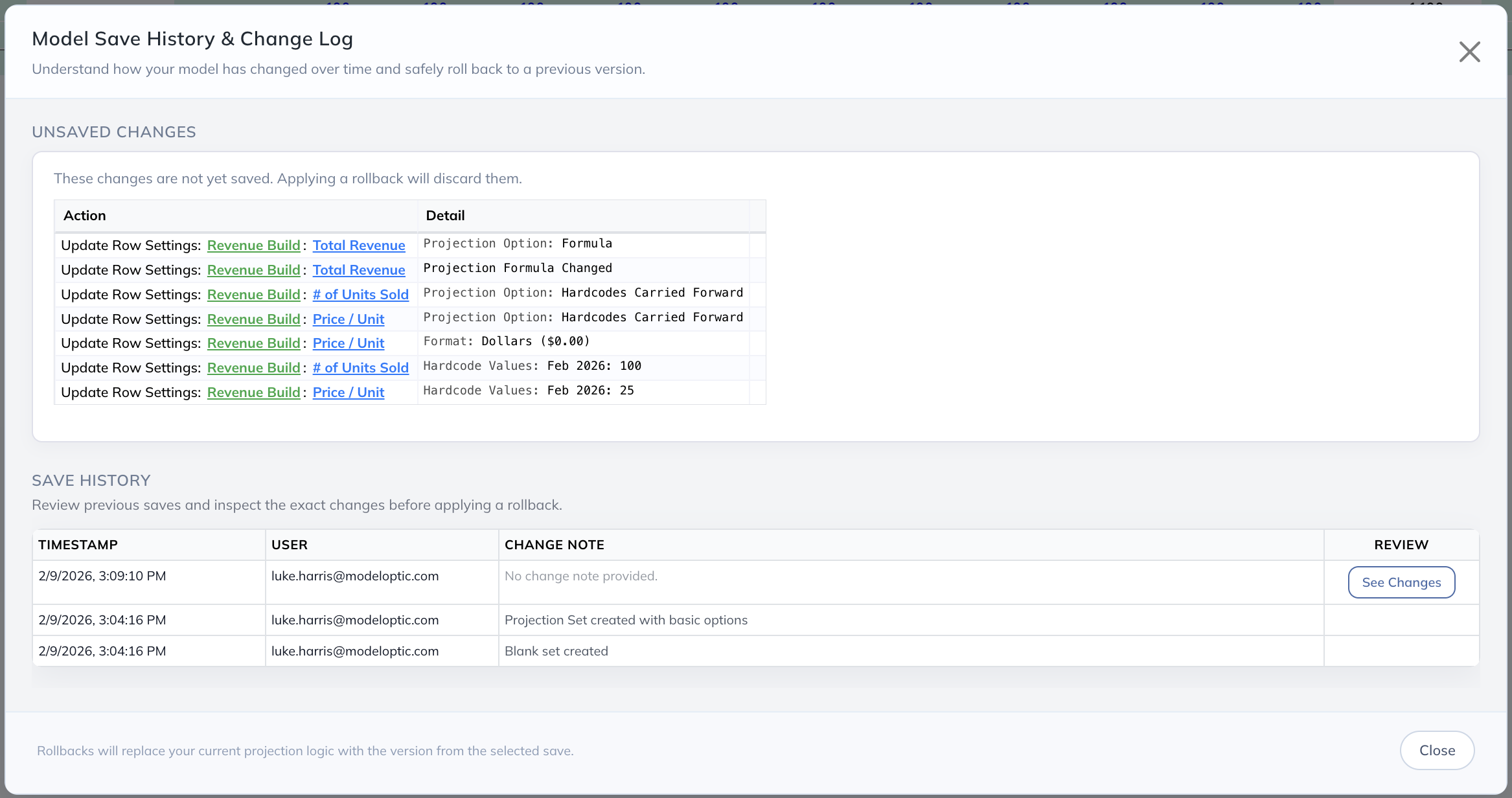
The top portion of this screen shows your current unsaved changes so you can review exactly what's changed in your current session before deciding whether you'd like to save those changes or not (if needed). Clicking on any entries in this log will navigate you to the relevant section of the page.
Under the "Save History" section, you can see every save that has been made within the active projection set. Clicking on any of the "See Changes" buttons shows a screen that looks like this:
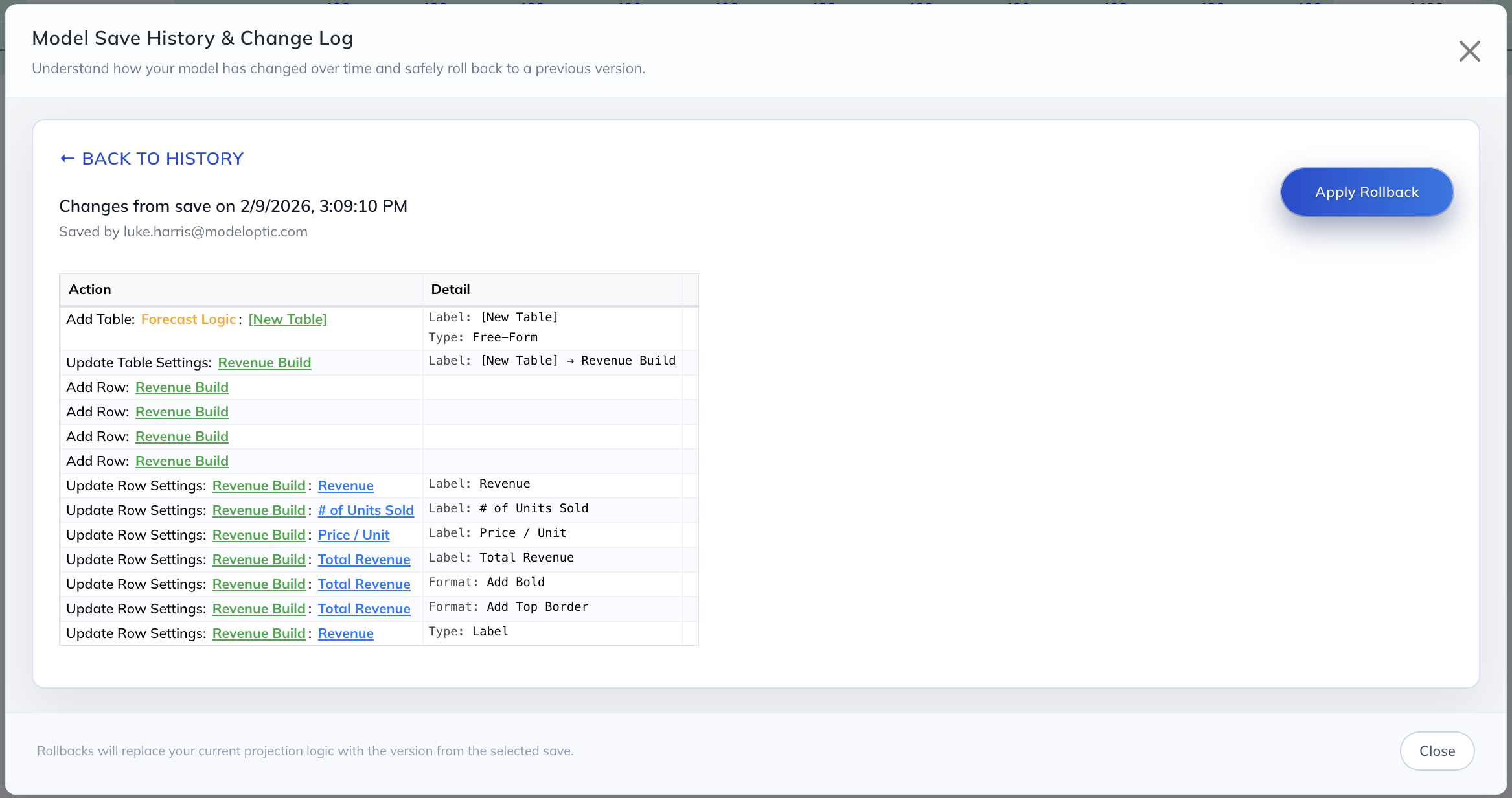
This shows you all changes that were made within this save. The "Apply Rollback" button lets you rewind the clock to view your model's state at a prior point in time (which you can then decide to save or not).
Excel is a powerful tool, but these capabilities continue to add to Modeloptic's advantage in building and maintaining your company's financial model.
Combined Model Page
Previously, the Model, Projection Sets, Historical Data, and Configuration sections of Modeloptic all lived on independent pages. We've now unified all of these different components onto one page to give you a more seamless experience and to make it quicker to jump between the different areas when making changes to your model.
You can access each component using the navigation bar at the top of the page:

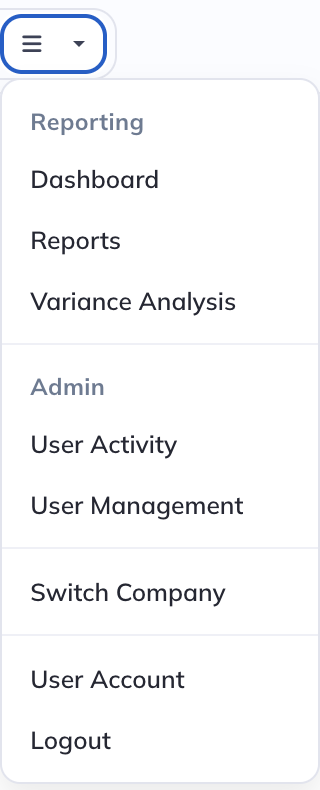
The menu on the right allows you to access the Reporting and Admin areas of Modeloptic, and replaces the old left panel navigation:
AI Agent Capability: Private Beta
We've been hard at work creating several AI agents that can help you build and edit your model, company configuration, and historical data mappings. We've been extremely impressed by the capability of these agents, and it's become clear that having AI assistance in building and iterating on financial models is far superior to entering logic manually, at least for many types of changes. We're now opening up access to these capabilities in private beta for existing customers.
If you're an existing customer (or would like to become one) and would like early access to test out these capabilities, please email us at contact@modeloptic.com, or click the "Request AI Access" button in the left panel of your instance on the Model page and we'll work with you to get you enrolled.
On the Roadmap
A few of the larger near term features we are considering adding next include the following:
- Public Release of AI Agent Capabilities
- Transaction Models (M&A and Capital Raising)
- Additional Data Integrations
Keep an eye out for additional functionality coming soon, and please feel free to contact us to let us know any thoughts you'd like to share on the future direction of the product!
Don't miss any updates
Join us to receive the latest news, articles, and updates from Modeloptic.
The Future of Finance
Ready to try out Modeloptic for your company?

AI-Powered Financial Modeling
© 2026 Modeloptic, LLC. All Rights Reserved.
The Future of Finance
Ready to try out Modeloptic for your company?
AI-Powered Financial Modeling
© 2026 Modeloptic, LLC. All Rights Reserved.