

Below we walk through building a full operating and LBO model using Modeloptic's AI agent. We'll use an illustrative subscription SaaS company, built from the perspective of a potential PE acquirer.
The full model was built in three steps, took the agent 11 minutes and 15 seconds, required zero human editsSee the Agent Performance & Expectations section below for more detail., and includes the same level of detail and sophistication that a top tier PE associate would include in a first look at a live deal.
We assume we're provided high level quarterly financials and a basic set of historical operating metrics from the company as a starting point.
If you'd like to build your own model in a live instance, you can create a trial instance and build one for the company of your choosing, or follow the same steps we do in this walkthrough to see Modeloptic in action live.
Download the example historical files:
Step 1: Financials & Setup
First, we'll set up the instance by uploading the provided historical financials and metrics, and we'll start by using the same IS/BS/CF accounts that the company uses in their financials.
We do that by opening the AI Agent panel, attaching our files, and providing instructions like so:
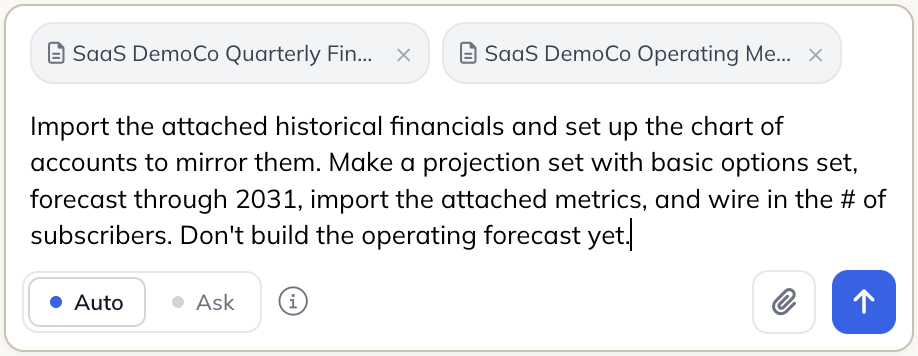
Import the attached historical financials and set up the chart of accounts to mirror them. Make a projection set with basic options set, forecast through 2031, import the attached metrics, and wire in the # of subscribers. Don't build the operating forecast yet.
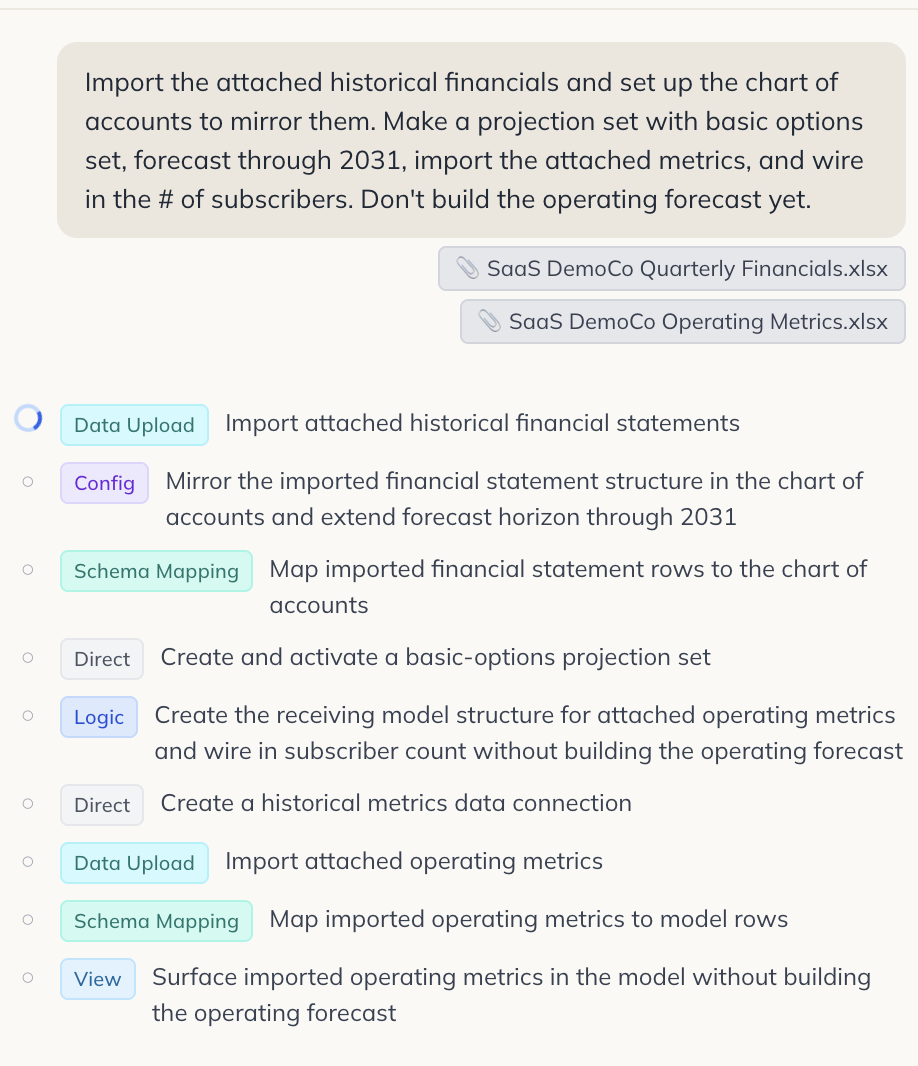
The agent will then get to work, showing its progress along the way:
Once it finishes the task, it'll report back with an overview of its changes, including a full list of every individual action performed:
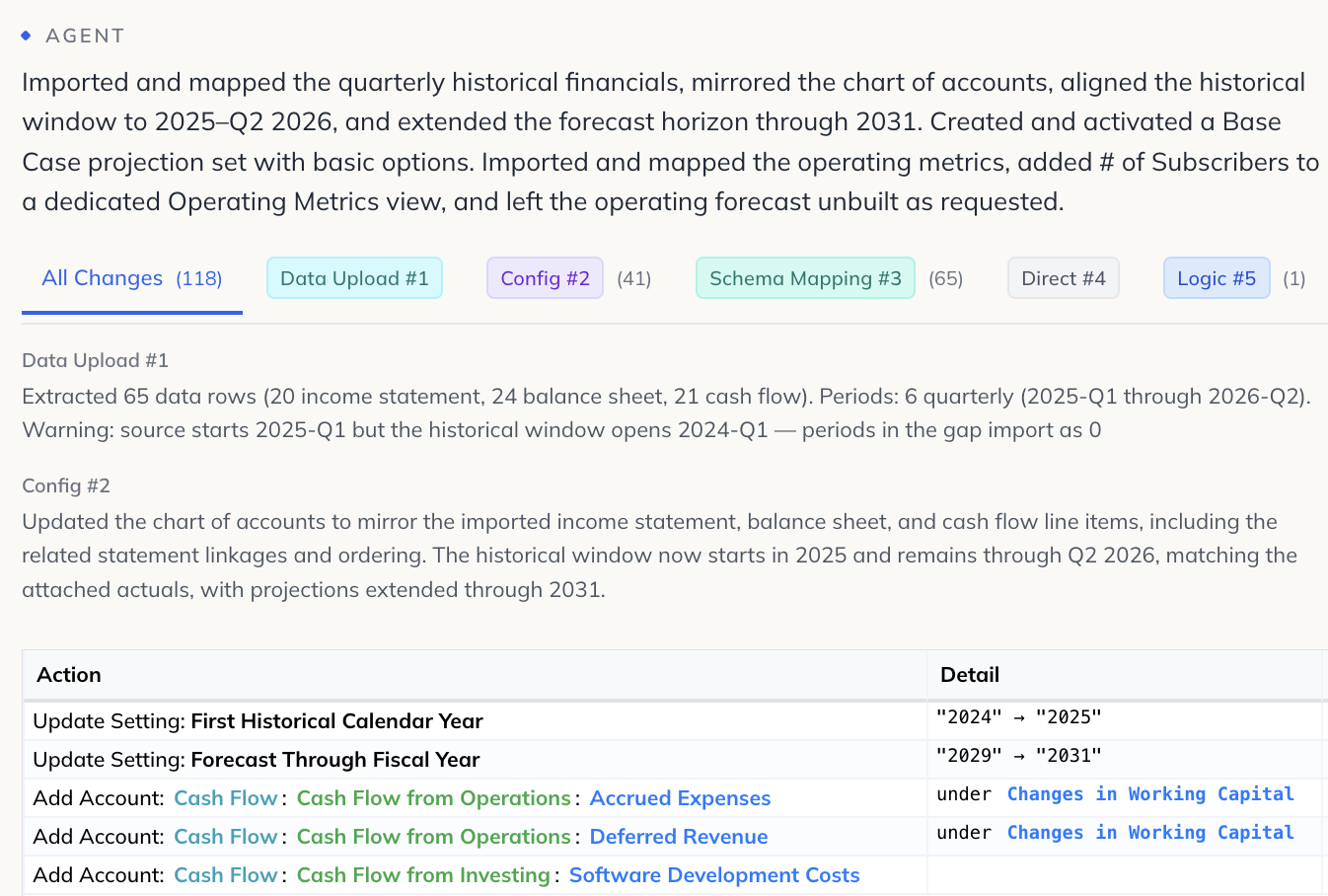
We can then choose to either preview the changes in an isolated environment, or apply them to our current instance.

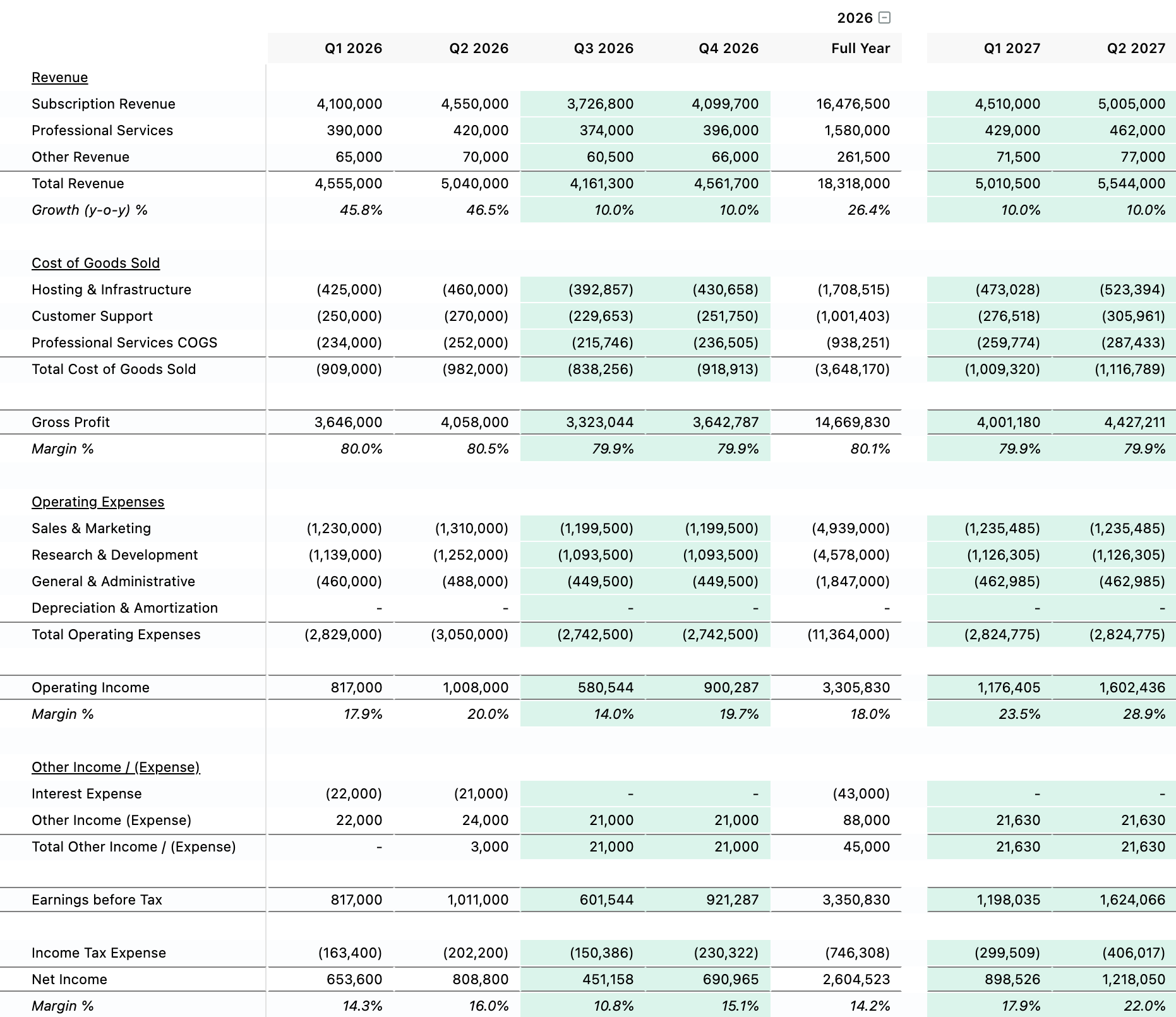
After applying them, we can see that our historicals were imported and our chart of accounts is set up as expected, and it's built a bare bones operating forecast for us as a starting point (using y-o-y growth rates, consistent margins, and trailing averages):
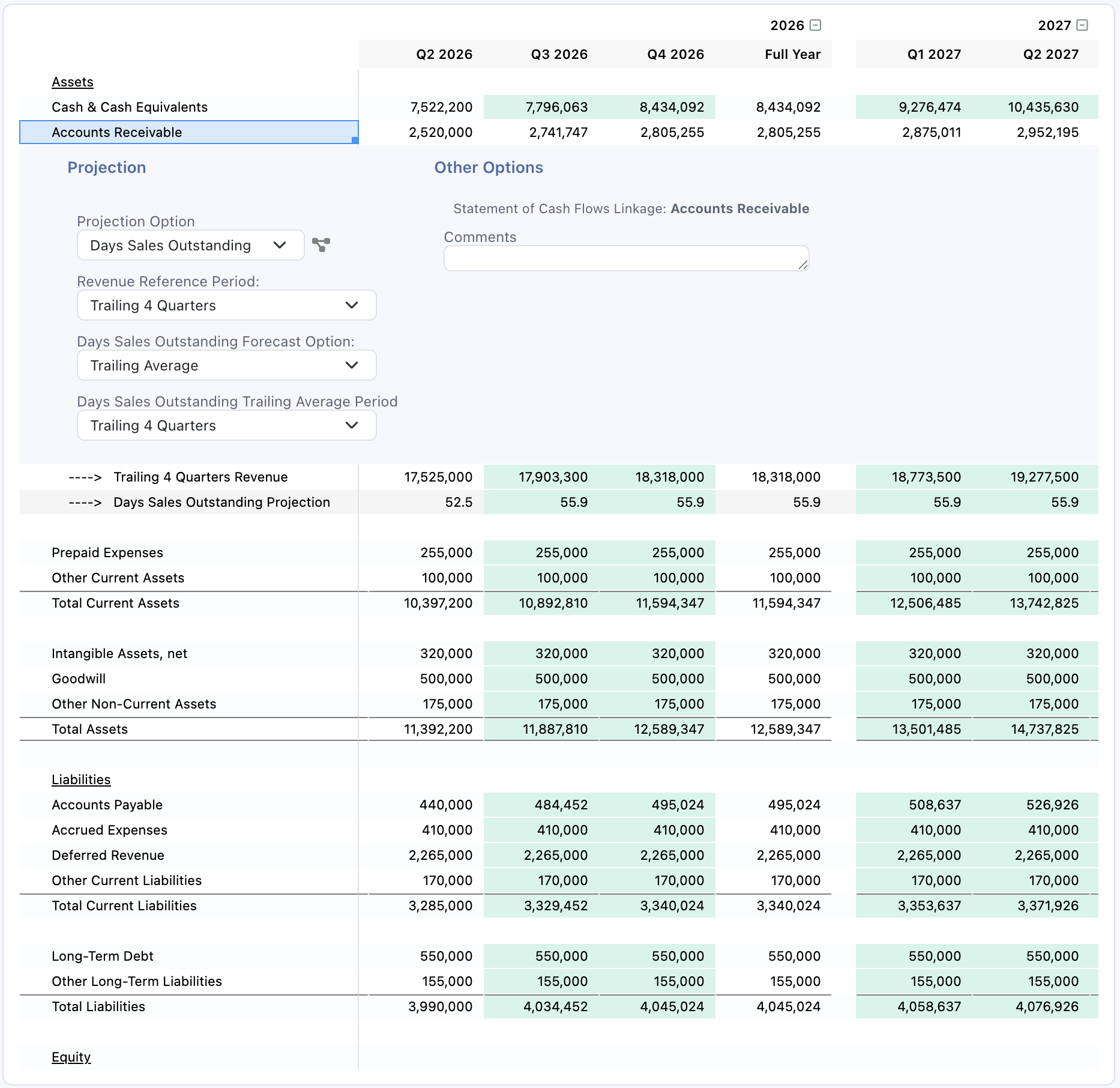
Our balance sheet is also set to a reasonable starting point, with accounts like AR using DSO consistent with recent history and others flatlined:
Step 2: Operating Forecast
Now we can make a more useful and sophisticated revenue build, and adjust a couple other areas in the initial operating forecast with the following instructions:
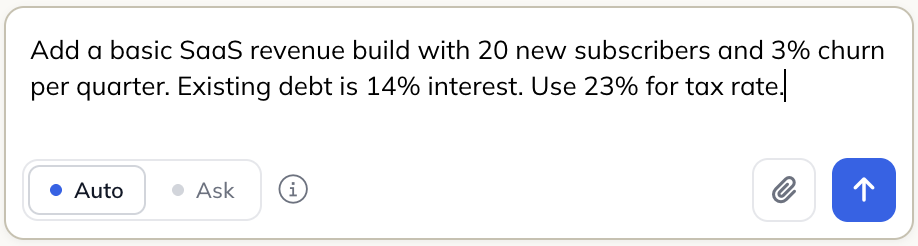
Add a basic SaaS revenue build with 20 new subscribers and 3% churn per quarter. Existing debt is 14% interest. Use 23% for tax rate.
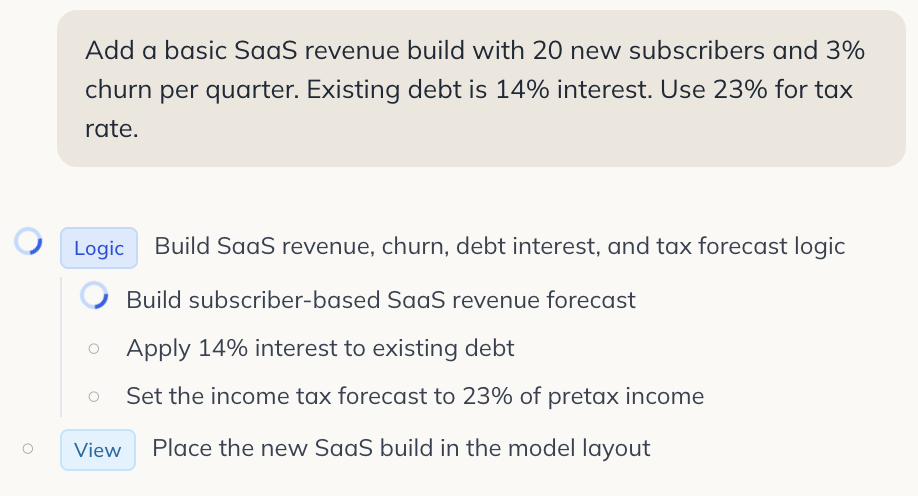
Like the first task, the agent will then get to work, showing its progress along the way:
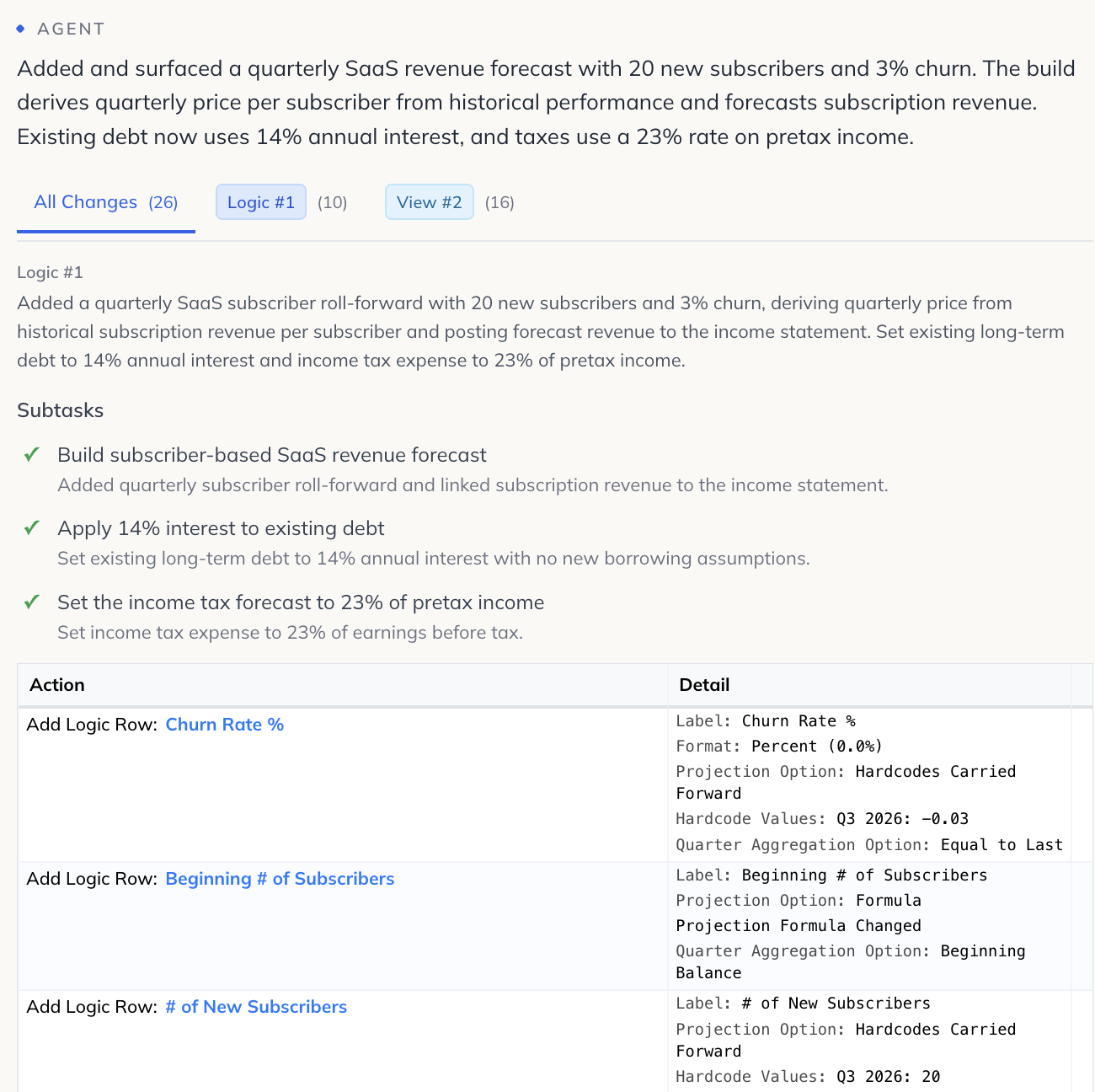
Once it finishes a little over a minute later, we get another rundown of the changes the agent made:
We again apply the changes and can review what the agent built:
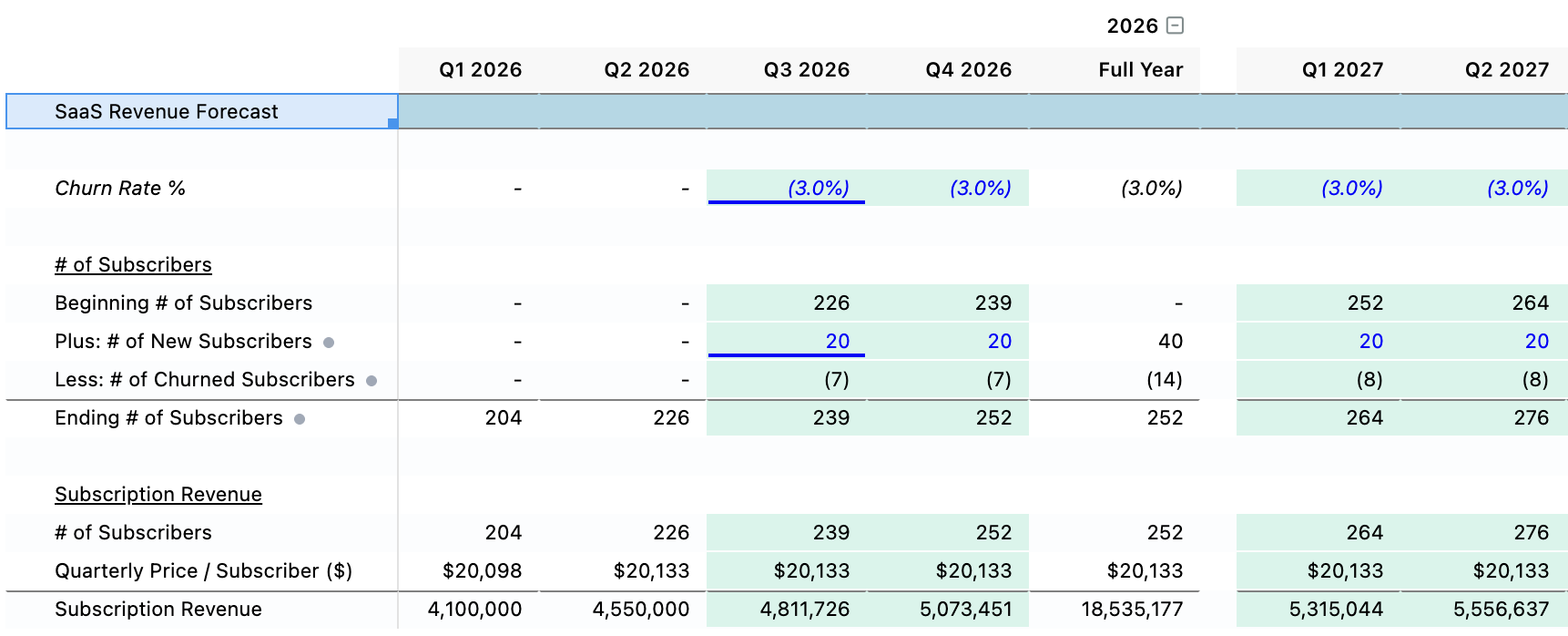
Now we have a decent high level revenue build to work with so we can sensitize various critical operating drivers like # of new subscribers, churn rate, and pricing.
Step 3: LBO Transaction
Now that we have a solid operating model to build on top of, we can layer on the acquisition with the following instructions:
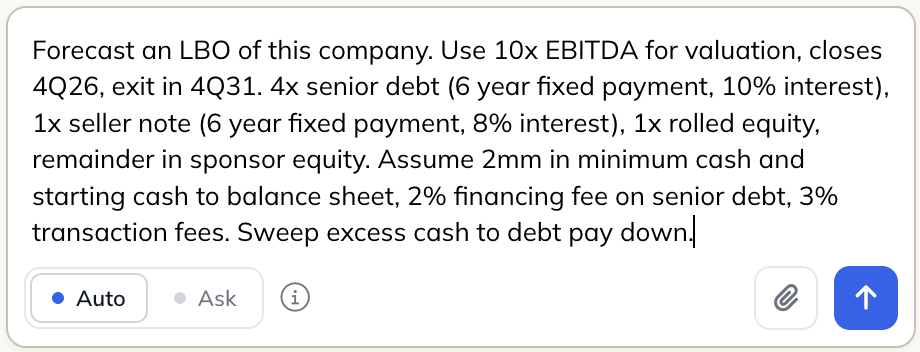
Forecast an LBO of this company. Use 10x EBITDA for valuation, closes 4Q26, exit in 4Q31. 4x senior debt (6 year fixed payment, 10% interest), 1x seller note (6 year fixed payment, 8% interest), 1x rolled equity, remainder in sponsor equity. Assume 2mm in minimum cash and starting cash to balance sheet, 2% financing fee on senior debt, 3% transaction fees. Sweep excess cash to debt pay down.
Like above, the agent will map out its tasks and update us on its progress as it goes:
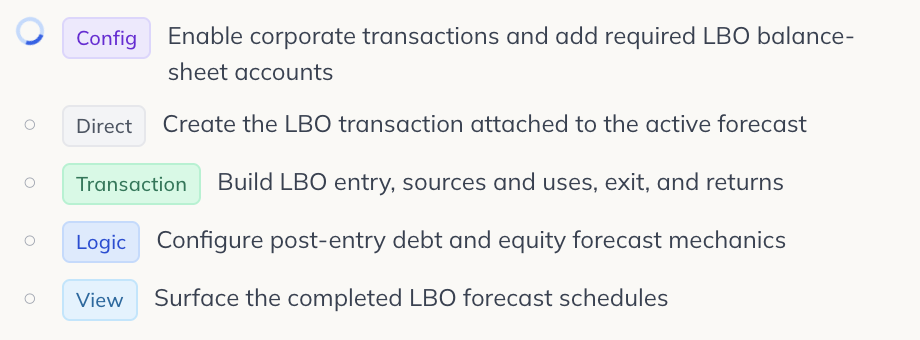
Once it finishes and we apply the changes, we can see that we have a fully fleshed out LBO model built from scratch.
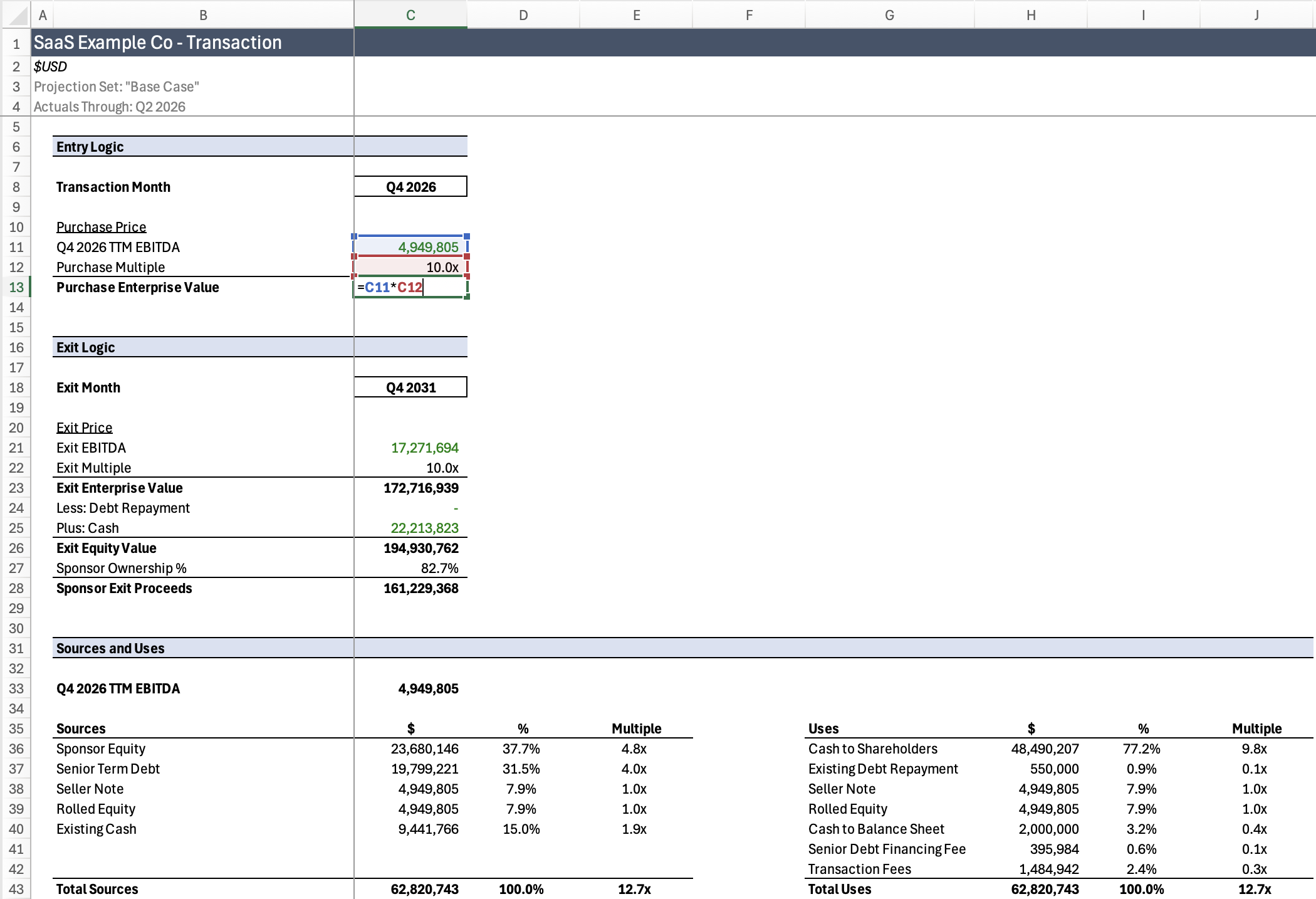
We can review and adjust the entry, exit, and S&U logic:
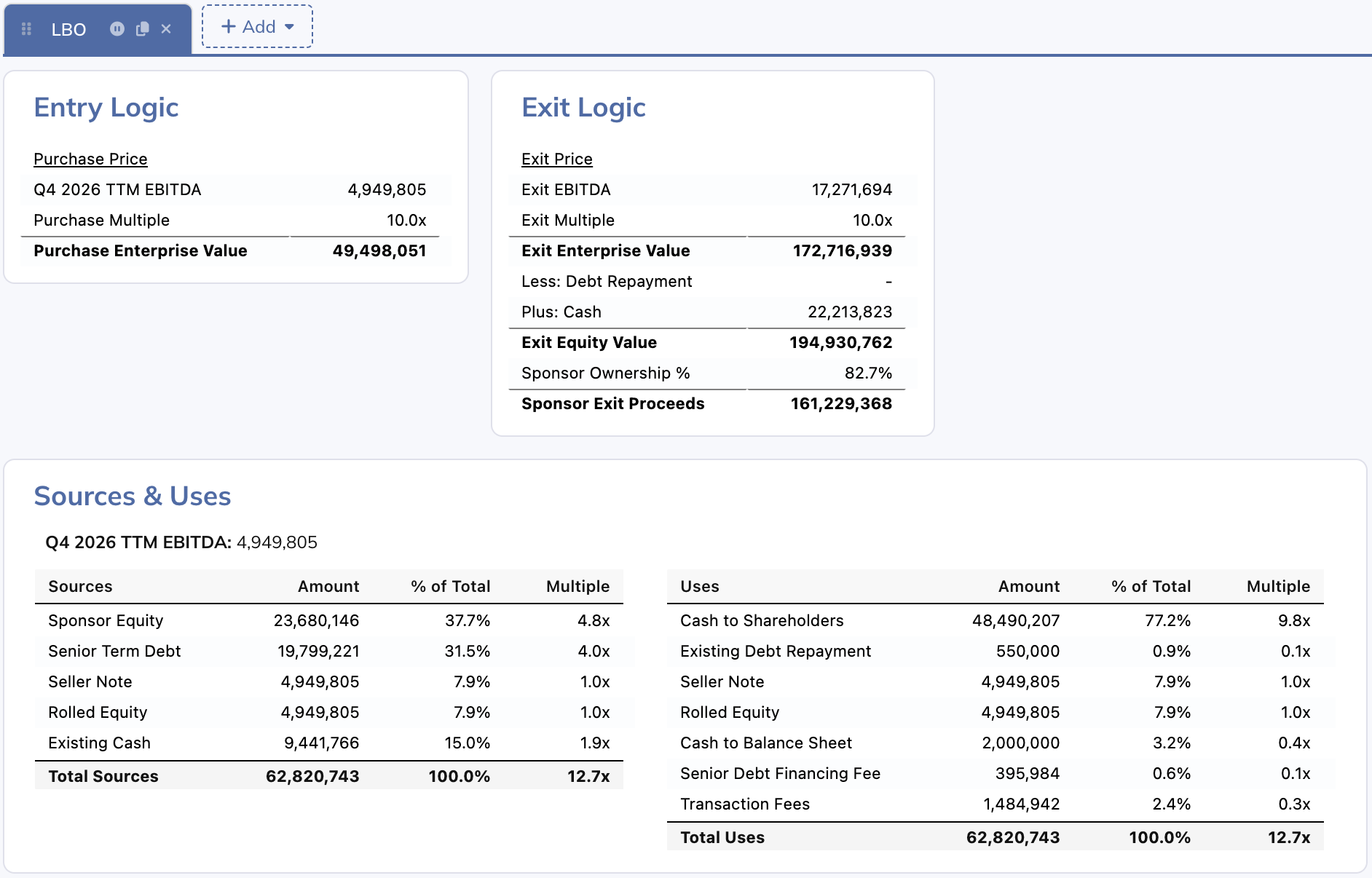
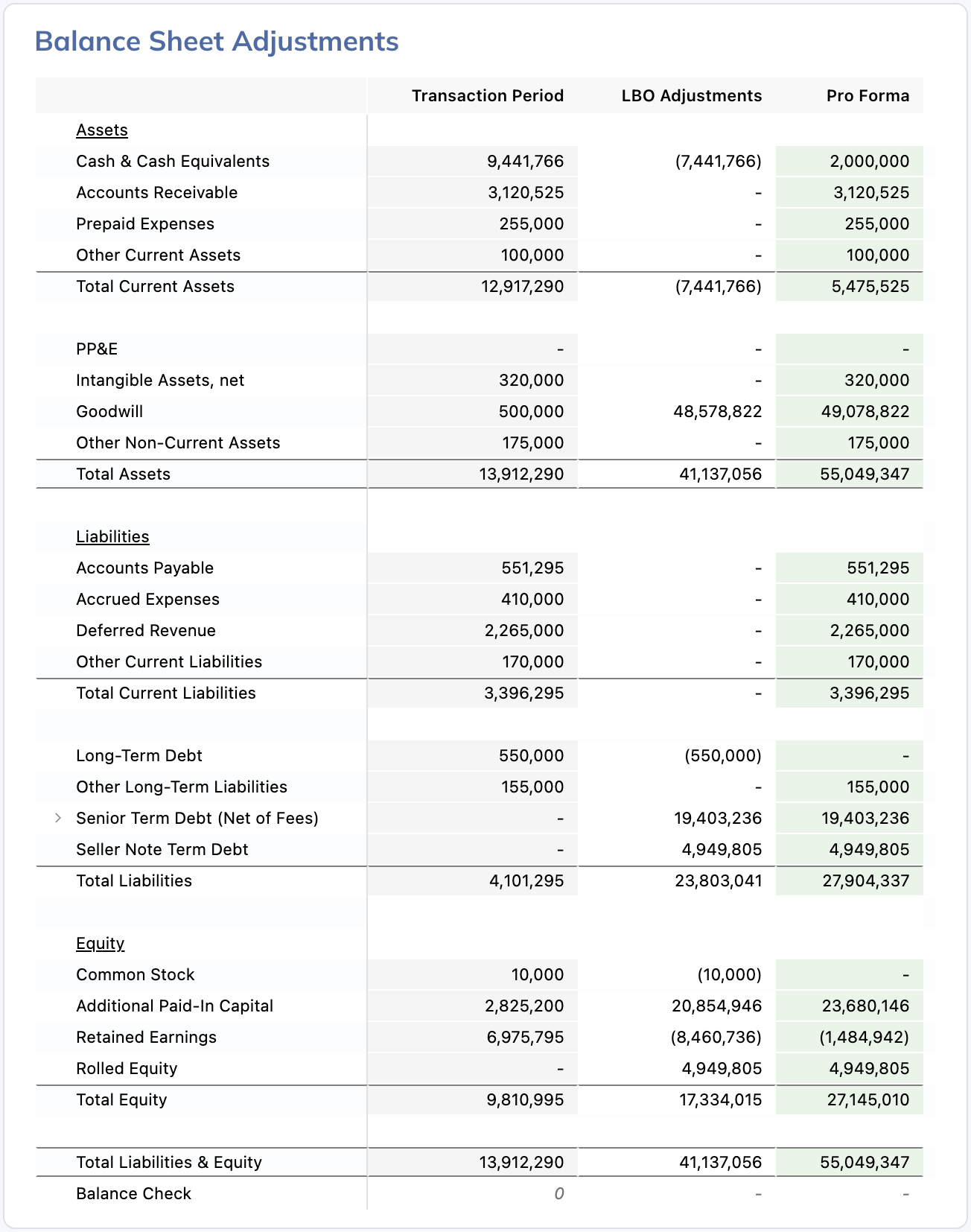
We can see that it put in the appropriate balance sheet adjustments in the transaction period:
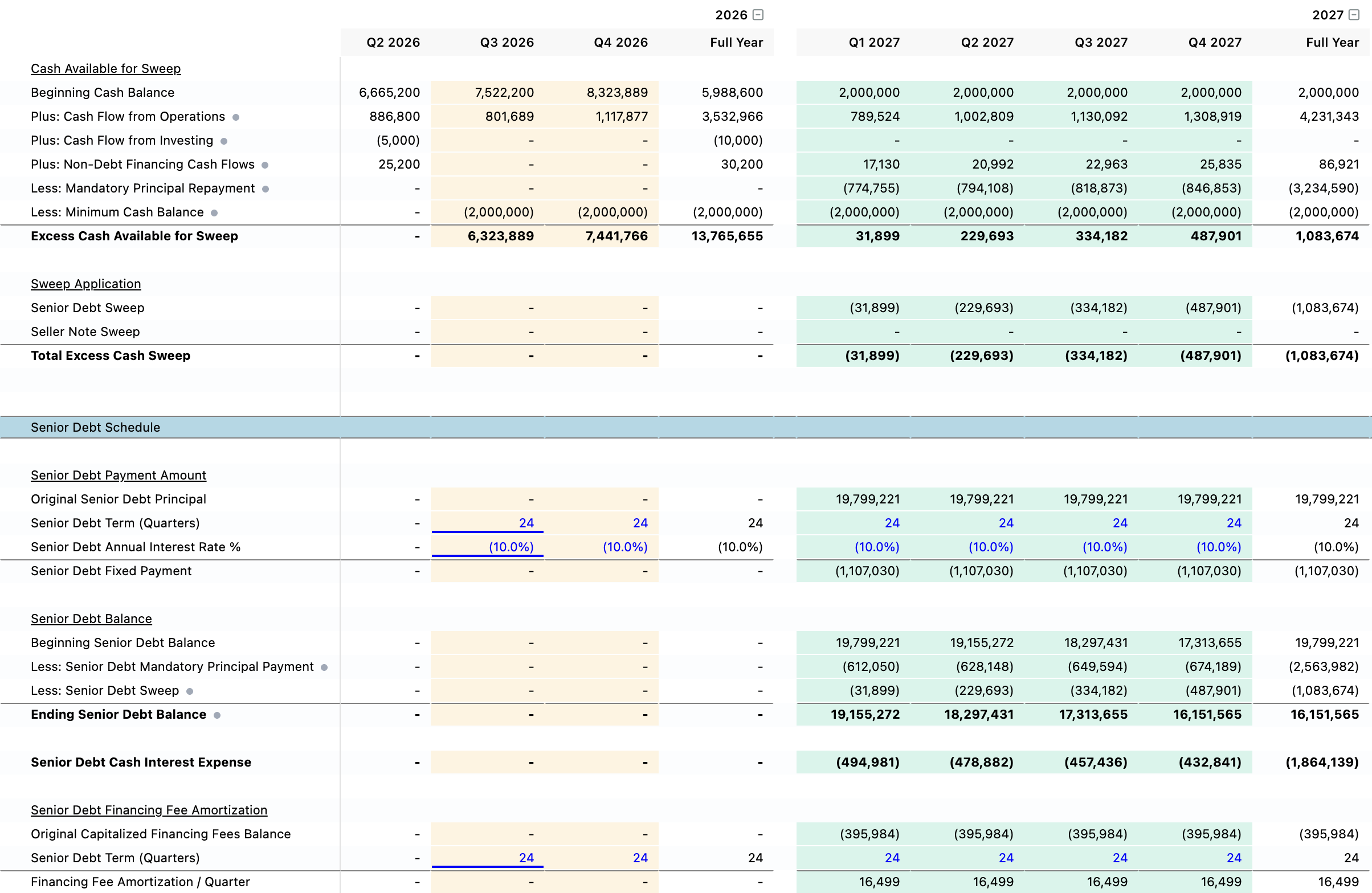
We told the agent to put in a cash sweep mechanism, so we review that it constructed everything as intended:
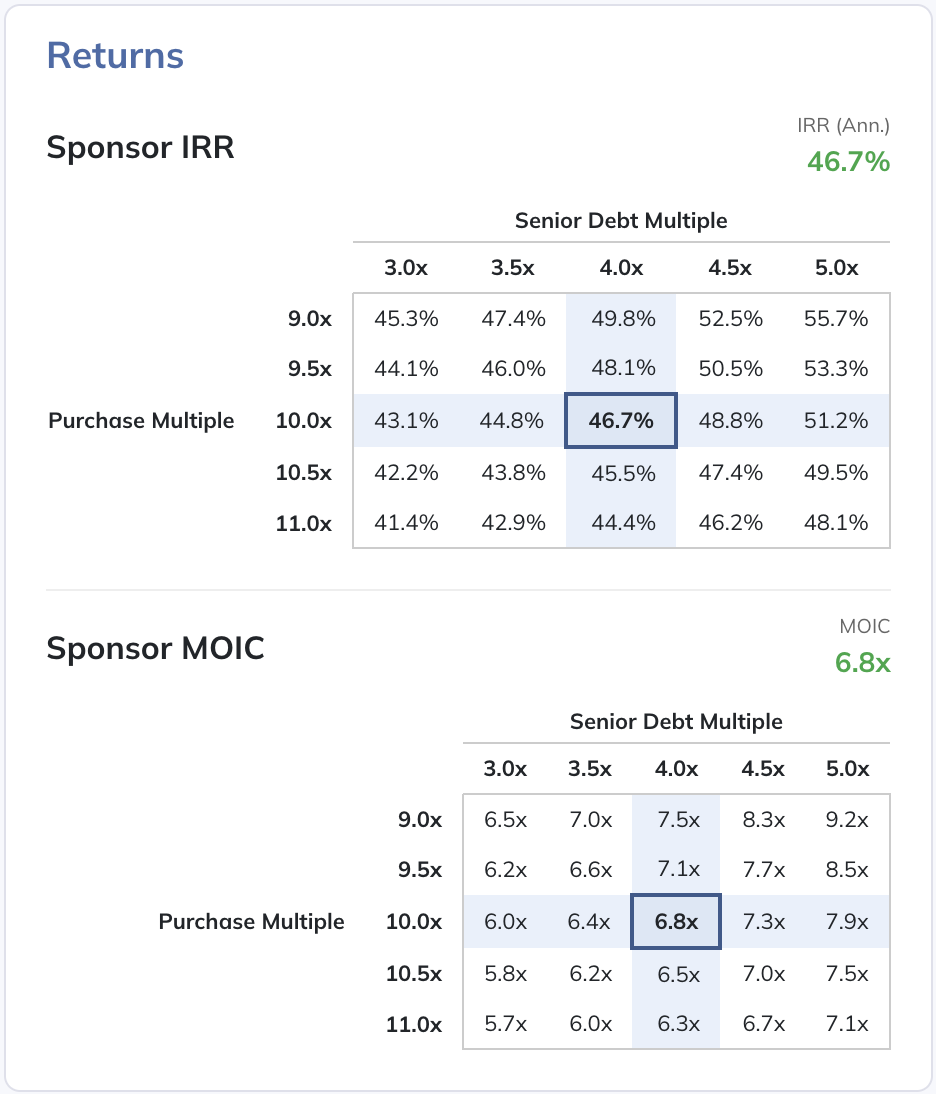
Finally, we can see what the current set of assumptions yields in terms of returns:
In addition to working with your model in the browser interface, Modeloptic lets you generate a fully-functional copy of your model in Excel with all formulas wired up, just like a top tier modeler would do had they built the model by hand:
If you want to see the Excel version of this model, you can download it here:
Model Contents
This model contains everything you'd expect in a full first cut of an LBO model from a top tier PE associate:
- Full operating model built on actual company financials with enough detail to sensitize changes in business performance
- Dynamic entry and exit assumptions, including timing
- Dynamic capital structure to fund the acquisition that includes debt, sponsor equity, seller note, and rolled equity — all common components of LBOs
- Proper balance sheet adjustments and new additions to the balance sheet chart of accounts to handle new components of the capital stack
- A proper debt sweep mechanism to use excess cash to pay down debt
- Standard returns analysis, including IRR and MOIC sensitivity
Compare the simple prompts we used with the model the agent built and you'll notice quite a few areas where the agent did useful things without us even needing to ask:
- It noticed that the instance was set to start the historicals in 2024 but the uploaded financials didn't start until 2025, so it shifted the start period forward to 2025 to avoid leaving a useless blank historical year
- It saw that we have financing fees on the senior debt, so it followed GAAP rules to capitalize the fees, net them against the debt balance, count the amortization as interest expense, and accelerate that amortization when we have periods that sweep cash to pay down the debt ahead of schedule
- It saw that we have rolled equity upon acquisition, and accounts for that properly in the exit proceeds paid out to the sponsor
- Instead of inventing an average revenue per user amount, it saw that we have the two components needed to calculate that value historically (Subscription Revenue and # of Subscribers), calculated ARPU, and carried that forward into the future to ensure our forecast is grounded in reality
Other Modeling Possibilities
Now of course, financial models are living documents, meant to be adjusted and explored. The IRR on this model as it stands is pretty rich, so we probably need to add in some more OpEx, for example, which can easily be done either by asking the agent to make a change, or by jumping in and adjusting the forecast yourself.
Some other possibilities that the Modeloptic AI agent readily supports:
- Minor assumption adjustments to the operating forecast (like mentioned above)
- Major operating structure changes, like switching customer contracts to be upfront annual rather than month to month, including building out the revenue recognition and deferred revenue mechanisms
- Additional operating cases with different assumption sets
- Additional acquisition cases with different assumption sets, whether on valuation, financing terms, or structure
- Additional follow on transactions post-LBO, including dividend recap, bolt-on acquisitions, etc
Agent Performance & Expectations
All told, all three steps above took the agent 11 minutes, 15 seconds to complete (3:36 for setup and the historical import, 1:18 for the operating forecast, and 6:21 for the LBO), with zero human edits required on this run.
To give you a sense of how consistent and reliable the agent is:
- Step 1 (historical import and instance setup) produced identical results 10/10 times
- Step 2 (basic SaaS revenue build) produced identical values 10/10 times with minor deviations in row labeling. In 3/10 runs it maintained a separate “Operating Metrics” view
- Step 3 (LBO build) also produced identical values 10/10 times, but was more variable in its layout and label choices. For example, in some runs, in the debt sweep section, it would create a separate “Non-Debt Financing Cash Flows” section with all of the component detail broken out and feed that into the “Cash Available for Sweep” calculation, whereas in other runs it would just sum up the target accounts in a single row. In 2/10 runs, it decided to exclude MOIC and only show IRR
The variations in the different runs for Step 3 mostly entailed verbosity vs conciseness trade-offs, which arguably just boil down to personal preference.
If you're an experienced AI user, this degree of consistency might seem surprising, but there are several reasons for it in this case:
- The prompts we used are simple and clear
- Step 1 just amounts to importing historical data, mirroring the chart of accounts, and using basic assumptions for the starting operating forecast. We've guided the agent on what “basic assumptions” should be for particular account types in the absence of explicit guidance: y-o-y growth rates for revenue accounts, % of revenue for CoGS accounts, trailing averages with modest growth over time for OpEx accounts, etc
- Step 2 asks for a simple SaaS build, and we give it 2 of the 3 key assumptions it needs (churn rate and # of new subscribers per period). We've taught the agent what gold standard SaaS builds should look like for various levels of complexity, and guided it to utilize historical metrics to inform projections when available, which it did for the 3rd key assumption (ARPU)
- For the LBO build in Step 3, we again gave it many of the key assumptions it needed, and for the ones we didn't explicitly state, we've taught the agent what defaults it should run with (assume a cash free / debt free transaction, stock deal, financing fees are capitalized, etc). We've also given the agent a blueprint to use when constructing a debt sweep mechanism, so it doesn't need to invent its own mechanism every time, it just needs to tailor the specifics
AI is still fallible, so we can't always expect perfection, but the rate at which LLMs in general (and our agent in particular) make mistakes continues to rapidly decline.
Next Steps
If you work in PE, investment banking, or another related field, I think once you've tried out Modeloptic, you'll see that financial modeling will never be the same. Our hope is that we can help you dramatically ramp up your deal throughput and free up some late nights.
If you'd like to read more:
- AI-Powered Financial Modeling Works Now
- Financial Modeling: Modeloptic vs Excel + AI Plug-In
- Give Your AI Agent a Domain-Specific Language
If you'd like to try out Modeloptic for yourself, you can sign up for a free trial instance and either follow the same steps that we did above, or build a model for a company of your choosing.
To speak with us, you can schedule a call here or send us an email at contact@modeloptic.com.