Basic Forecasting
Overview
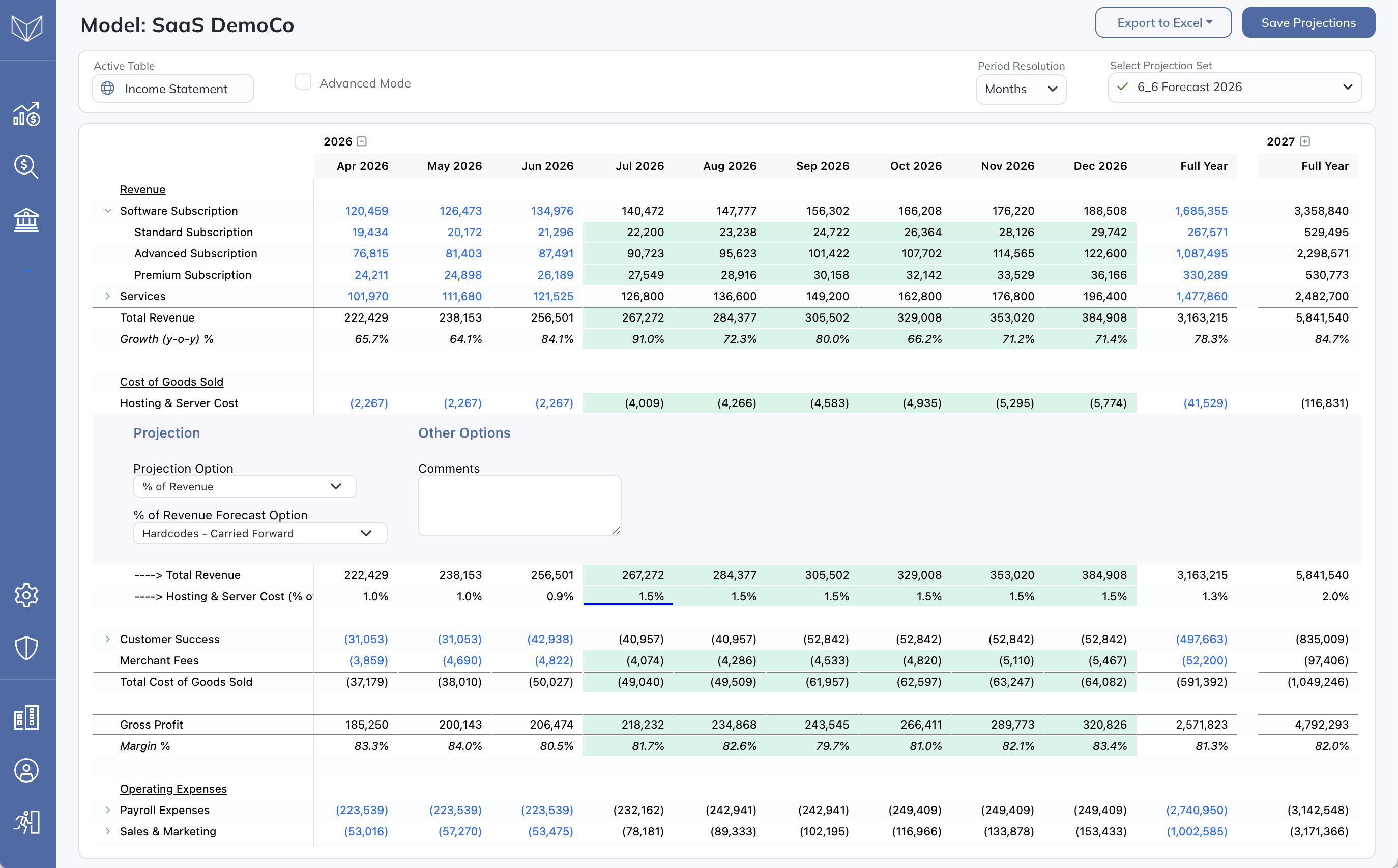
Modeloptic provides many off the shelf means of forecasting particular line items. To edit the forecast for an income statement or balance sheet line on the Model tab, simply click on the line label to expand the line item detail.
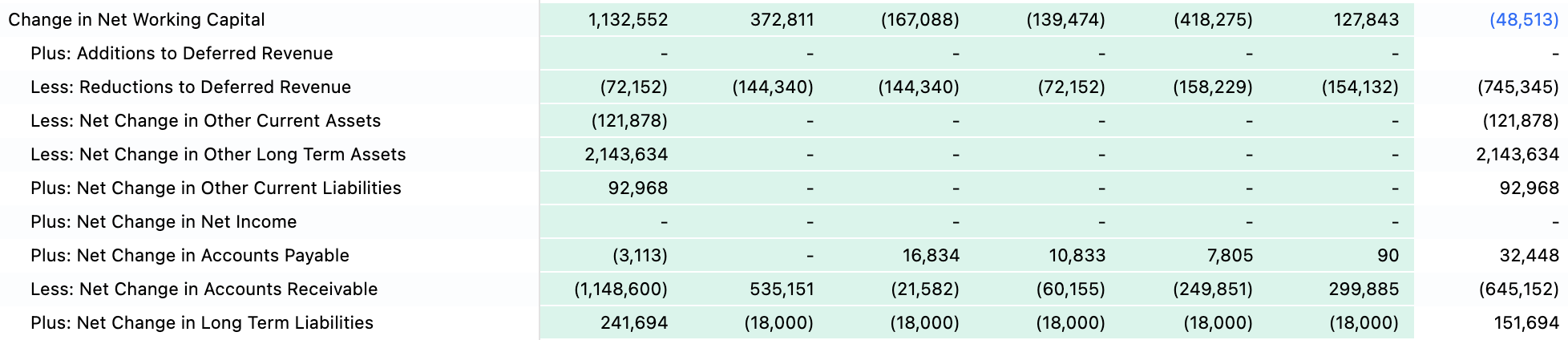
Clicking on line items on the Statement of Cash Flows will show detail related to the components of that line, which is discussed in more detail below.
Revenue Forecasting
For revenue line items, you will see the following options:
- Growth Rate - Year-Over-Year: Specify growth rates at the company’s Period Resolution. Each rate applies to revenue in the same period of the prior year.

- Formula: Allows you to create your own custom formula to project this line. This option is covered in detail in the Advanced Forecasting section of this guide.

- Hardcodes: Enter values separately for each forecast period.

- Hardcodes - Carried Forward: Enter a value in a forecast period and carry it forward until the next period with an explicit input.

- Trailing Average: Set every period of the first projection year to the average of the last historical periods chosen in Trailing Average Period; the choices follow the company’s Period Resolution. With Trailing Average Future Year Growth Rate %, each later year steps up by that rate, compounding.

- Flatline: Set each projected period equal to the latest historical period’s value.

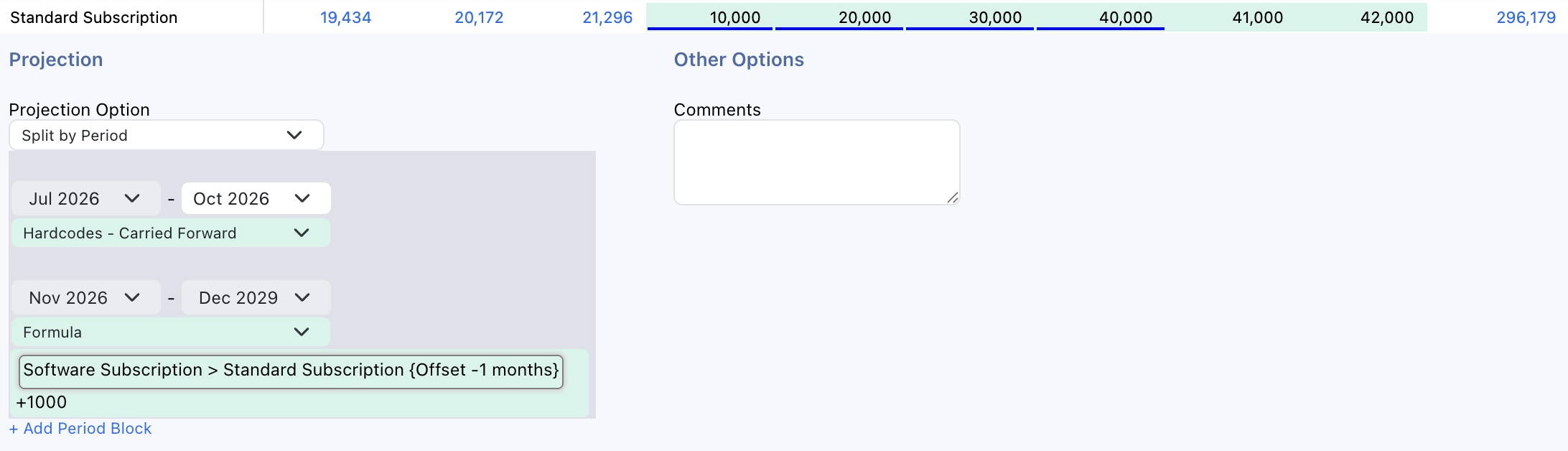
- Split by Period: Instead of specifying only one option for the entire forecast period, this option lets you break the forecast period into sub-periods and forecast each independently using the options outlined above.
Expense Forecasting
In addition to most of the above options, expenses can also be forecast as a percentage of revenue:

Note that Modeloptic uses the convention of showing expenses as negatives, so you should be sure to follow suit with the projections you create.
Balance Sheet Basics
The Cash and Retained Earnings accounts are special account types that are not forecast directly, but are instead calculated based on all of the other assumptions in the model. Within Retained Earnings, dividends can optionally be forecast using % of Net Income, Hardcodes, Hardcodes - Carried Forward, or a Formula.
Balance Sheet methods depend on the account type set in Configuration. Ordinary balance accounts offer Formula, Hardcodes - Carried Forward, Hardcodes, Trailing Average, Flatline, and Split by Period; type-specific methods are described below:
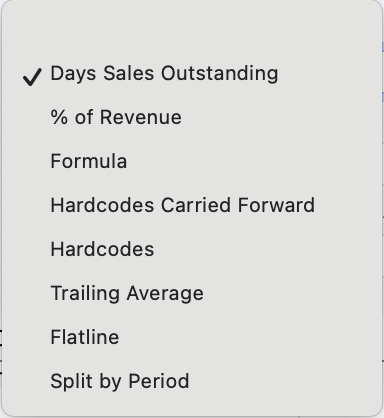
Depending on the type of balance sheet account, additional options will be available as well, which are described in more detail below.
Balance Sheet: Accounts Receivable
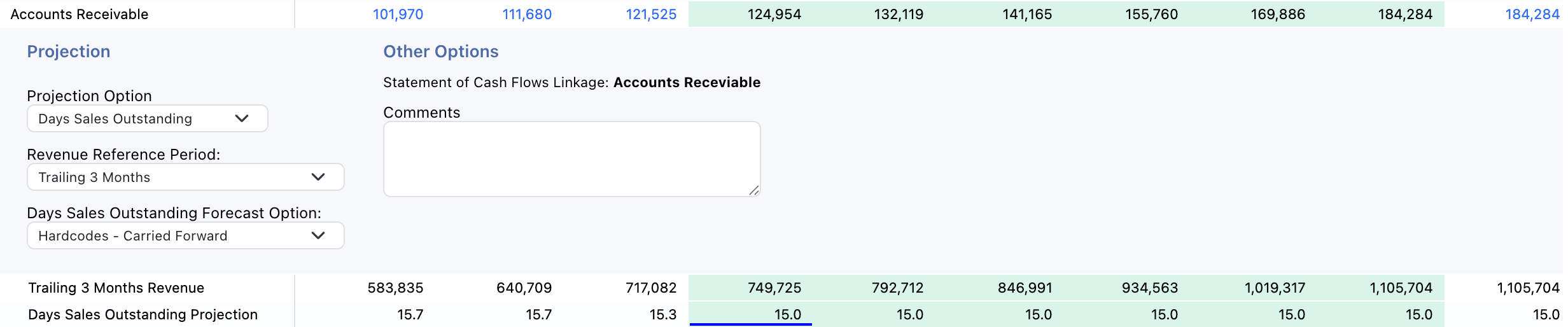
AR can be forecast using Days Sales Outstanding (DSO), which translates to the approximate number of days it takes the company to collect cash payment on its revenue once it's been earned. Simply choose a reference period for historical revenue (the annualized current period or one of the trailing windows offered for the company’s Period Resolution) and a means of forecasting DSO to calculate your projected AR balance:
Balance Sheet: Inventory
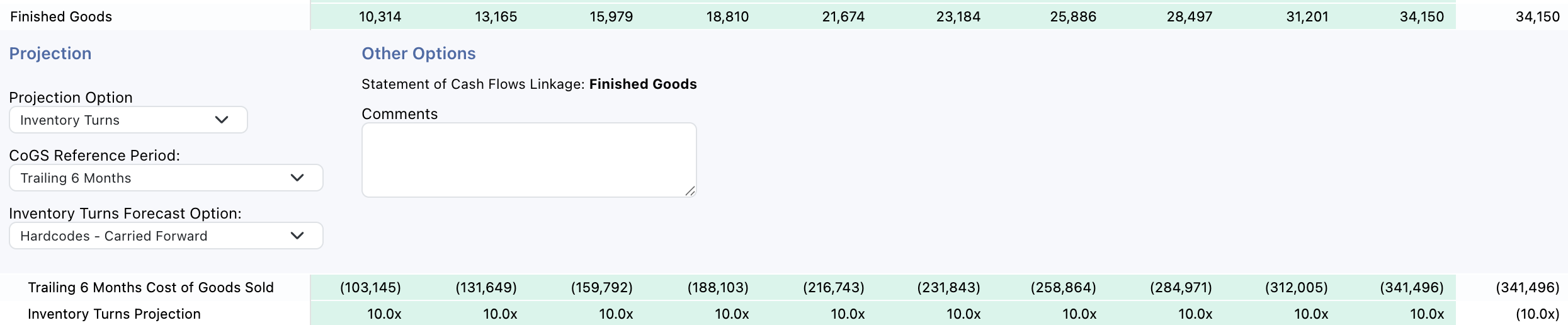
Inventory can be forecast using Inventory Turns or Days Inventory Outstanding. Inventory Turns represents how many times a company sells and replaces inventory during a specific period while Days Inventory Outstanding represents the average number of days Inventory is held before being sold. Simply choose a CoGS reference period for either method (the annualized current period or one of the trailing windows offered for the company’s Period Resolution) and a means of forecasting Inventory Turns / Days Inventory Outstanding to calculate your Inventory Balance:
Balance Sheet: Accounts Payable
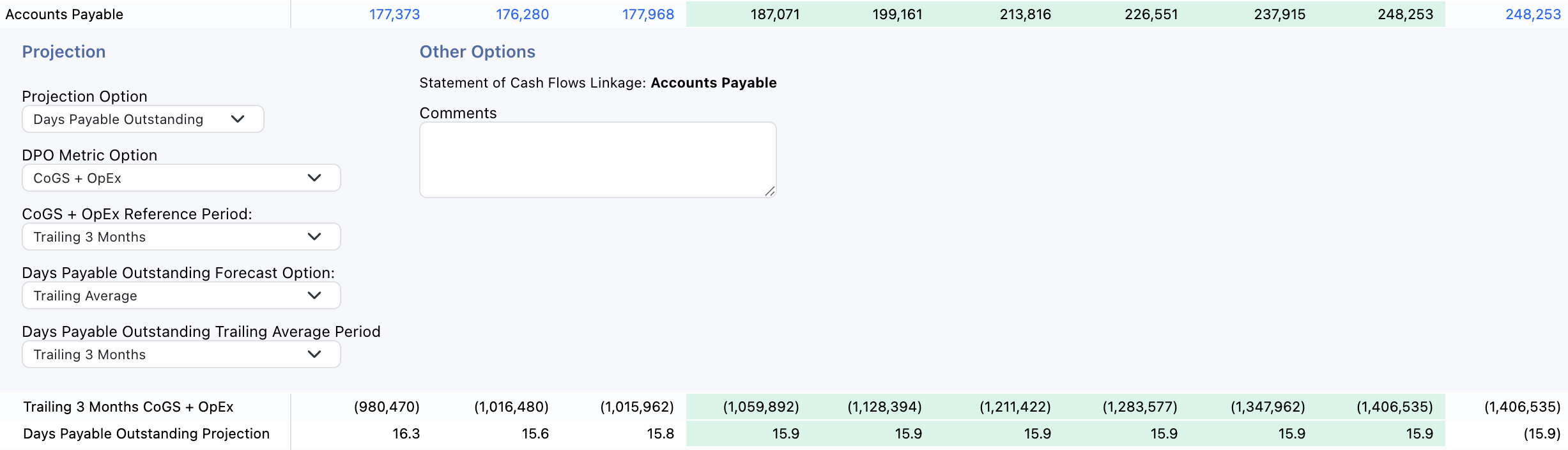
Much like AR, AP can be forecast using Days Payables Outstanding (DPO), which translates to the approximate number of days it takes the company to pay its bills once an expense has been incurred. First decide if you'd like to reference CoGS, OpEx, or both for reference expenses. Then choose a reference period for the expenses (the annualized current period or one of the trailing windows offered for the company’s Period Resolution) and a means of forecasting DPO to calculate your projected AP balance:
Balance Sheet: Complex Account Types
Balance sheet accounts with a type of PP&E, Intangible Assets, Goodwill, Prepaid Expenses, and Deferred Revenue are all forecast in two components: Additions and Reductions to the balance.
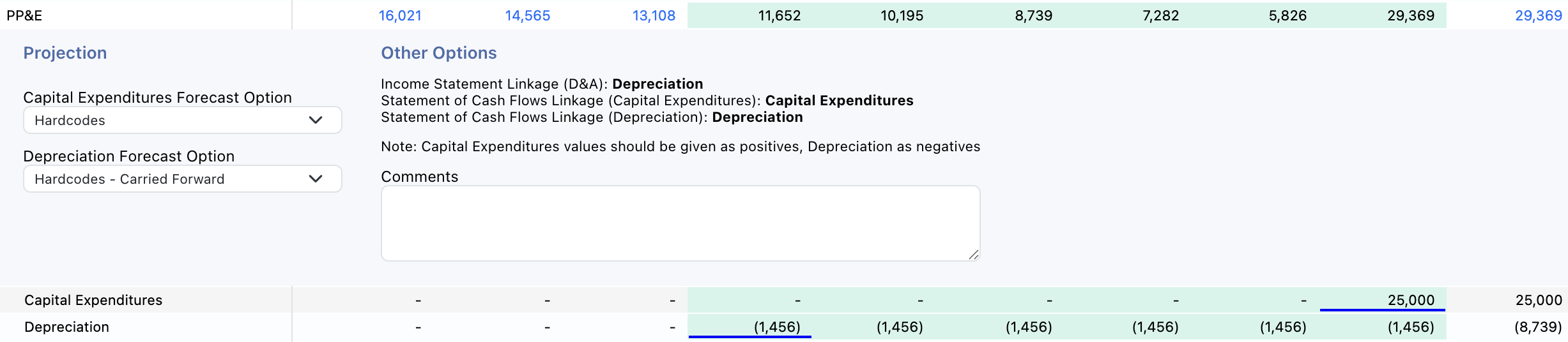
For each Additions and Reductions section, choose Formula, Hardcodes, or Hardcodes - Carried Forward. To link another model line, choose Formula and add a reference inside the editor. Configure the two components separately.
Balance Sheet: Debt
Debt can be forecast using one of two options: Basic or Formula. Under the Basic option, you will see sections for both Additions and Reductions to the balance, with Formula, Hardcodes, or Hardcodes - Carried Forward available for each:
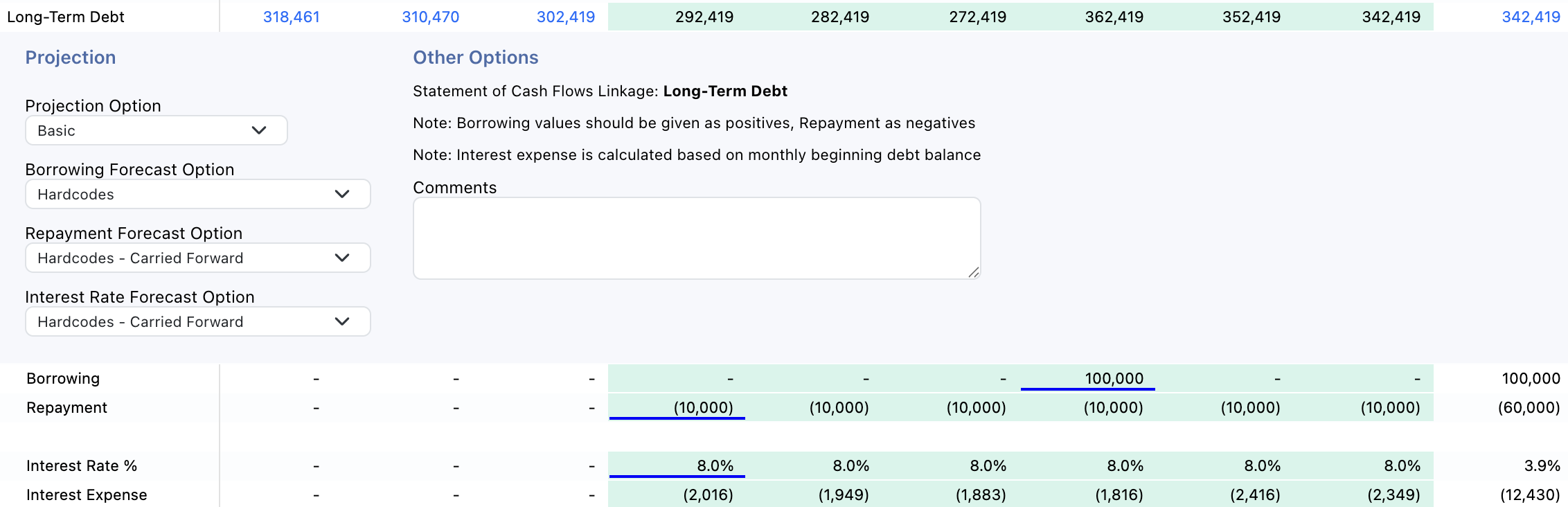
Debt items also have the additional requirement that you forecast interest expense, which is automatically fed into the Interest Expense line on the income statement.
The Formula option allows you to create formulas that calculate both the Debt Balance as well as the Interest Expense and looks something like this:

This will allow you to forecast your debt in another Table and then link to it using the formula boxes. Writing formulas will be described in more detail inside the Advanced Forecasting section of this guide.
Statement of Cash Flows
As in standard accounting practice, the statement of cash flows is derived from the income statement and balance sheet, so nothing needs to be forecast here directly. Linkages between lines on the balance sheet and lines on the statement of cash flows are set on the Configuration tab, which is discussed in more detail in the Company Configuration section of this guide.
Clicking into any line on the statement of cash flows will show you the components of that line: